There are few tools more used in today’s business environment than email. For some, email is an indispensable part of their life; to others email is a menace where good ideas and important information goes to die.
A recent interaction with a client went something like this: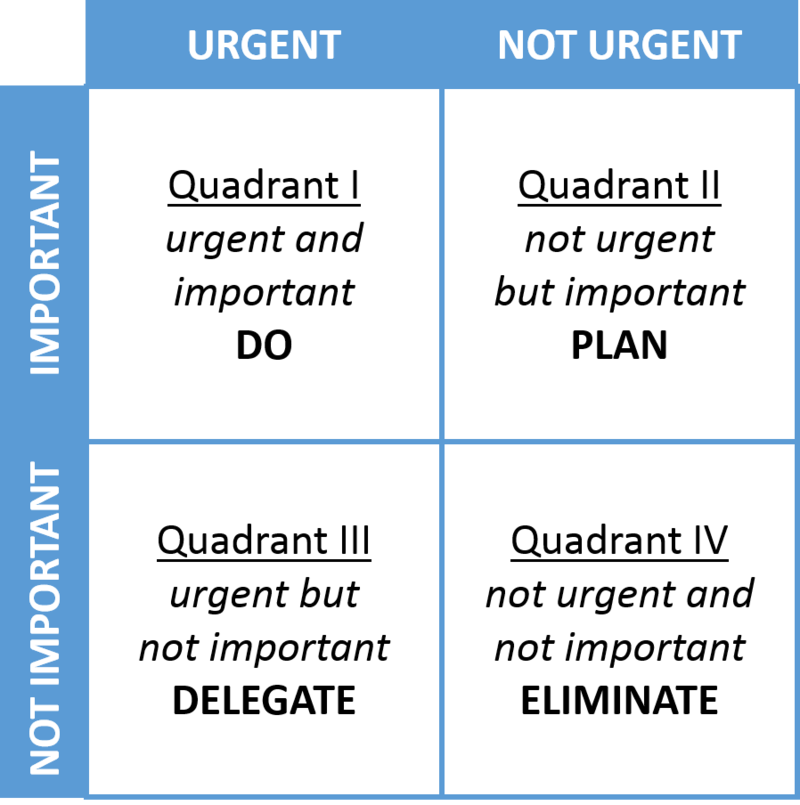
Me: “Did you get the forms I sent over?”
Client: “Uh..I think so…hang on a sec, let me look…ummm…oh here it is. Yeah, sorry I was out of the office last week and I’ve got a ton of emails to get to..”
Me: “I understand. How bad is it? How many emails do you have in your inbox?”
Client: “36,531.”
At that point it was clear that managing digital forms of communication isn’t his strong suit. I get it. I’m a reformed email abuser.
Get to Zero
No single thing has changed the way I work more than implementing “Inbox Zero.” I spend less time on emails, fewer items or important tasks get missed and I am more responsive to clients and coworkers.
As the name implies, Inbox Zero is reaching and maintaining the goal of having 0 items in your inbox. In order for this to work, there are a few things you need to do:
- Set up rules – If you’re using an email client such as Microsoft Outlook or Gmail, these tools have a built-in capability to create rules for how specific emails are treated. For example, if you get a daily or weekly report in your inbox, create a rule to move these emails automatically to a folder designated for reports. Then create a spot on your calendar to review those reports. This prevents those emails, which are important, but not necessarily time-sensitive, from clogging your inbox.
- Create a follow-up folder – For emails where you receive a response but still need additional follow-up or are awaiting additional responses, move these emails to that follow-up folder. You can use a tool such “Flag or Follow Up” in Outlook or Boomerang in Gmail to assign a due date for follow-up.
- Create organizational folders – For emails that you can’t safely delete and need to keep, file these in a folder. For example, emails from a specific customer can be kept in a folder named after your client. In Gmail, these are referred to as labels rather than folders.
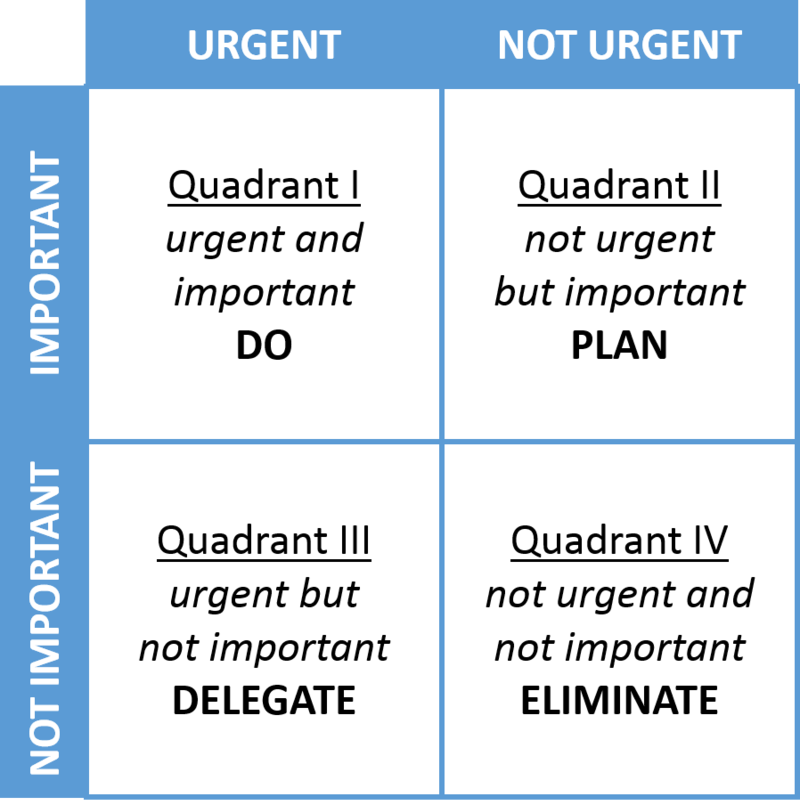
- Prioritize your inbox – If you get a high volume of email, it sometimes helps to divide your emails into categories. For example, I use the Eisenhower Decision Matrix (see image (which should look familiar if you’ve read Getting Things Done.) Items with high importance with an urgent need for response get handled immediately. Less important emails get scheduled or delegated to others. Many items do not require a response and have little value; these read and delete immediately.
Getting Started
One of the hardest things about getting to Inbox Zero is getting started. To do this, you can use sorts and mass delete for many items. For example, when I started cleaning out my emails I found a large number in my inbox that were from a vendor that’s no longer in business. I searched on this company name and mass deleted everything. You can also search and mass-apply labels or move to folders.
When I first started, I was worried I might lose something important, but I found the opposite was true. I spent less time and effort finding important emails because everything was so well organized.
Implementing Inbox Zero is simple, but it’s not easy. It takes a lot of diligence and a complete change in your habits. If you implement this, it will save you time and make you more efficient and more responsive.
Feeling inspired? Let us know on Facebook, Twitter or LinkedIn.
Additional Resources
Getting Things Done Inbox Zero
HubSpot’s 4 Methods for Achieving Inbox Zero
Step by Step Directions for Setting up Inbox Zero in Gmail
{{cta(‘4d798207-47e4-4599-85f3-661efbed7217’)}}